Models And Basic Fields
-
 Amrit Panta
- Jan. 23, 2024, 11:09 a.m.
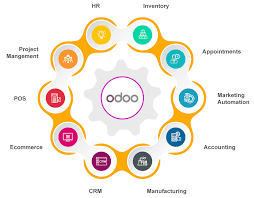
Odoo is organized into various modules, each addressing specific business functions or processes. Modules in Odoo cover a wide range of applications, allowing businesses to choose and implement the ones that are relevant to their operations. Here are some of the core modules available in Odoo:
-
Sales Management:
- Handles sales orders, quotations, and customer management.
-
Customer Relationship Management (CRM):
- Manages customer interactions, leads, opportunities, and customer communication.
-
Inventory Management:
- Tracks stock levels, manages warehouses, and handles inventory movements.
-
Manufacturing:
- Supports manufacturing processes, including bill of materials, work orders, and production planning.
-
Purchase Management:
- Manages procurement processes, purchase orders, vendor relationships, and inventory replenishment.
-
Accounting:
- Covers financial management, including invoicing, accounting, and financial reporting.
-
Human Resources (HR):
- Manages employee information, leaves, attendance, payroll, and other HR-related functions.
-
Project Management:
- Helps in planning, tracking, and managing projects, including tasks, timesheets, and project costs.
-
Website Builder and CMS:
- Allows the creation and management of websites, including e-commerce functionalities.
-
eCommerce:
- Facilitates online sales and includes features for managing products, orders, and customer interactions.
-
Point of Sale (POS):
- Manages retail sales and includes features for in-store transactions and inventory management.
-
Discuss (Messaging):
- Provides internal communication tools, including messaging and discussion channels.
-
Time Off (Leave Management):
- Manages employee leaves and time-off requests.
-
Survey:
- Allows the creation and management of surveys and feedback forms.
-
Events:
- Manages events, including event planning, registrations, and ticketing.
-
Maintenance:
- Supports equipment and maintenance management.
-
Field Service:
- Manages on-site services, including scheduling and dispatching field technicians.
-
Fleet Management:
- Handles the management of a company's fleet of vehicles.
-
Quality Management:
- Manages quality control processes for products and services.
-
Localization Modules:
- Various modules exist for localization purposes, including those for specific countries or regions, covering legal and accounting requirements.
These are just a few examples, and there are many more specialized and industry-specific modules available in the Odoo ecosystem. The modularity of Odoo allows businesses to select the modules that best fit their needs, providing a customized and scalable solution. Additionally, users can create custom modules to extend Odoo's functionality further.
Business objects are declared as Python classes extending Model, which integrates them into the automated persistence system.
Models can be configured by setting attributes in their definition. The most important attribute is _name, which is required and defines the name for the model in the Odoo system. Here is a minimum definition of a model:
from odoo import models

class TestModel(models.Model):
    _name = "test_model"
This definition is enough for the ORM to generate a database table named test_model. By convention all models are located in a models directory and each model is defined in its own Python file.
Model fields
Fields are used to define what the model can store and where they are stored. Fields are defined as attributes in the model class:
from odoo import fields, models

class TestModel(models.Model):
    _name = "test_model"
    _description = "Test Model"

    name = fields.Char()
The name field is a Char which will be represented as a Python unicode str and a SQL VARCHAR.
Simple field examples are Boolean, Float, Char, Text, Date and Selection.
Much like the model itself, fields can be configured by passing configuration attributes as parameters:
name = fields.Char(required=True)
Some attributes are available on all fields, here are the most common ones:
string (str, default: field’s name)
The label of the field in UI (visible by users).
required (bool, default: False)
If True, the field can not be empty. It must either have a default value or always be given a value when creating a record.
help (str, default: '')
Provides long-form help tooltip for users in the UI.
index (bool, default: False)
Requests that Odoo create a database index on the column.
Automatic Fields
You may have noticed your model has a few fields you never defined. Odoo creates a few fields in all models1. These fields are managed by the system and can’t be written to, but they can be read if useful or necessary:
id (Id)
The unique identifier for a record of the model.
create_date (Datetime)
Creation date of the record.
create_uid (Many2one)
User who created the record.
write_date (Datetime)
Last modification date of the record.
write_uid (Many2one)
User who last modified the record.