Software process And requirements.
-
 Amrit Panta
- May 13, 2023, 9:05 a.m.
In this tutorail we will learn about the software,it's process , requirements and many more.
Software
Software refers to a set of instructions, programs, and data that enable a computer to perform specific tasks. It is a collection of programs, files, and data that can be installed and run on a computer or other electronic device.
Software is basically :
An instruction: When executed, provided features,functions and performances.
A Data Structure: Enables programs to adequately manipulate the informaiton.
A Document: Is a written description about how to use software.
Software engineer: It is a professional who designs,develops,tests and maintains software systems.
software engineering: it is the process of designingg,building,testing and maintaining software systems in an organized,systematic and efficient manner.
Types of software
Software can be categorized into two main types: system software and application software.
1.System Software
It refer to the low level software. System software is designed to manage and operate the computer including the hardware and system resources, such as the operating system, device drivers, and utility programs.
operating system:windows,linux,macOS
device drivers:Software that allows the operating system to communicate with and control hardware deveices such as printers,graphics cards and network adapter.
utility programs: It is the type of system software that provides esssential tools for maintaining and optimizing a computer performance. exampe of utility software include:
Disk cleanup:software that deletes temporary files and other unnecessary data from computer's hardware.
Anti-virus/Anti-malware:Software that protects a computer from malicious software and virus attacks.
Backup and restore: Software that creates copies of imporatnt daat and files allowinfg them to be restore if lost or demaged.
2.Application software
Application software, on the other hand, is designed to perform specific tasks or functions for the user, such as word processing, spreadsheet, database management, or multimedia applications.
examples of application software are:
Office productivity software: Microsoft office,libreoffice e.t.c
Graphics design software: Adobe photoshop,GIMP
web browser: Google crome,Mozilla firefox
Video editing software: Adobe premiere, Final cut pro e.t.c
Software can be created using programming languages such as C++, Java, Python, and many others. Once the software is created, it can be distributed and installed on multiple devices or systems. Software is constantly evolving, with new updates, patches, and versions being released to improve performance, fix bugs, and add new features.
Characteristics of software
There are several characteristics of software that distinguish it from other types of products:
-
Intangibility: Software is intangible, which means it cannot be touched or felt physically. It exists in the form of electronic code, data, and instructions.
-
Flexibility: Software is highly flexible and can be easily modified, customized, or upgraded to meet changing user needs.
-
Complexity: Software can be highly complex, involving thousands or even millions of lines of code, algorithms, and data structures.
-
Non-perishable: Unlike physical products, software does not wear out, rust, or deteriorate over time. It can last indefinitely with proper maintenance and updates.
-
Scalability: Software can be easily scaled up or down to accommodate different hardware platforms, user requirements, and organizational needs.
-
Digital distribution: Software can be easily distributed and installed over the internet, making it widely accessible to users around the world.
-
Easy replication: Software can be easily replicated and distributed, with no loss of quality or fidelity.
-
Rapid development: Software can be developed rapidly using modern software development methodologies, such as agile or DevOps.
-
Intellectual property: Software is protected by intellectual property laws, such as copyright and patent laws, to prevent unauthorized copying, distribution, or use.
-
Interoperability: Software can interact and communicate with other software applications and systems, allowing for seamless integration and interoperability.
Software Quality Attributes
Software Quality Attributes, also known as software quality characteristics or software quality attributes, refer to the key qualities or properties that define the overall quality of a software system. These attributes are the characteristics that software developers, testers, and users use to evaluate and judge the quality of a software product. Some of the most common software quality attributes include:
-
Functionality: This refers to the ability of a software system to perform the intended functions or tasks as specified by the requirements.
-
Reliability: This refers to the ability of a software system to function correctly and consistently over time and under different conditions.
-
Usability: This refers to the ease of use and user-friendliness of a software system, including the ease of learning, ease of use, and user satisfaction. The software should be easy to use and understand for its intended users.
-
Efficiency: This refers to the ability of a software system to perform tasks quickly and with minimal resource usage, such as processing time, memory usage, or network bandwidth.
-
Maintainability: This refers to the ease with which a software system can be maintained and modified over time, including the ease of making changes, fixing defects, and adding new features.
-
Portability: This refers to the ability of a software system to operate on different hardware platforms or operating systems with minimal changes or adaptations.
-
Security: This refers to the ability of a software system to protect itself and its users from unauthorized access, attacks, or data breaches.
-
Testability: This refers to the ease with which a software system can be tested and evaluated, including the ability to identify and diagnose defects and faults.
-
Scalabilty: The software should be able to handle increased loads and demand over time.
-
Performance: The software should be fast and efficient with acceptable response times ans minimal errors.
Overall, software quality attributes are essential for ensuring that a software system meets the needs of its users, operates reliably and efficiently, and is easy to use and maintain.
Software Development Lifecycel(SDLC)/Software process Model
SDLC is a methodology in which the processes are defined to create the high quality software.It is a structured approach to developing software applications that involves a series of well-defined phases or stages. The SDLC process provides a systematic and organized approach to software development that helps to ensure the successful completion of projects on time, within budget, and to meet the expected quality standards.
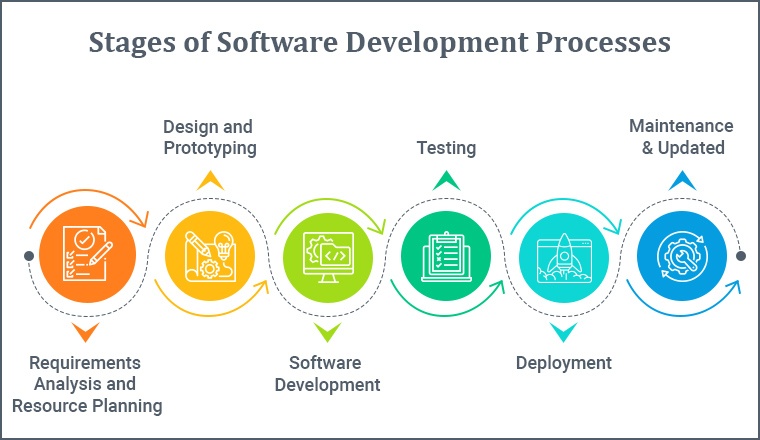
The different phases or stages of the SDLC process typically include the following::
-
Analysis/Planning: In this phase, the project team identifies the goals and objectives of the software project, defines the requirements, and determines the scope of the project. creates a detailed plan for the software development process, and budget planning.
-
Design: In this phase, the project team designs the software application, including the user interface, database schema, software architecture, and algorithms.
-
Implementation/Development: In this phase, the project team writes the code, integrates various components, and performs unit testing, programmer uses software design description by chossing any programmimg language to code modules.
-
Testing: In this phase, the project team performs system testing, integration testing, and acceptance testing to ensure that the software application meets the requirements Task performed during testing phase are
-Quality Assurance,Quality Control and testing performed before mass production testing. Qulity Assurance (QA):Finding errors,system re-engineer. Quality Control(QC):Writing technical reviews,software testing , code inspections
5.Deployment: In this phase, the project team deploys the software application to the production environment. Running the product into the server system
6.Maintenance: In this phase, the project team performs ongoing maintenance and support activities to ensure the continued performance and reliability of the software application. Task performed during are
-Keep software stable and up to date
-New Bugs and vulnerabilities are solved.
Software process Model
A software process model is a representation of the software development process that guides the development of software applications. The process model provides a framework for organizing the tasks, activities, and deliverables involved in software development. There are several software process models that are widely used in the software industry.Some of the most popular models include:
-
Waterfall model: This is a linear, sequential model where each phase of the development process is completed before moving to the next phase. The waterfall model is well-suited for projects with well-defined requirements and stable technology.
-
Agile model: This is an iterative, incremental model where software development is performed in short cycles or sprints. The Agile model is well-suited for projects with rapidly changing requirements and complex systems.
-
Spiral model: This is a risk-driven model where software development is performed in a series of iterations that combine the elements of the waterfall and iterative models. The spiral model is well-suited for complex, high-risk projects.
-
Prototype model: This is a model where a working prototype of the software application is developed before the full-scale development. The prototype model is well-suited for projects where requirements are not well understood or rapidly changing.
-
DevOps model: This is a model where software development and operations are combined into a single, continuous process that emphasizes collaboration, automation, and rapid feedback.
Each software process model has its own strengths and weaknesses, and the choice of model depends on the specific requirements of the software development project. The key to successful software development is to select the appropriate process model and to apply it in a disciplined and structured manner.
1.Waterfall Model
The waterfall model is a squantial software approach in which each stage of the process must be completed before moving on to the next.the model emphasize documentation and is best suited for the project with well defined requirements and predictable outcome. However , it has limited flexibility and does not accommodate changes easily.The Plan-driven software development model, also known as the Waterfall model
Phases of waterfall model includes:
1.Requirements Analysis 4.Testing
2.System Design 5.Deployment
3.Implementation/Coding 6.Maintenance
Advantages:
1.Easy to understand and develop the model
2.Documentation is prepared in each pahse
Disadvantages:
1.Difficult for a requirement change if process is underway.one phase must be completed to move to the nest phase
2.uni-directional
2.Incremental Development Model
Incremental development is a software development approach in which a product is developed in small,incremental releases.Each release builds upon the previous one to create fully functional product.
it allows for changes and feedback to be incoprporated throughout the development process,making it more flexible than waterfall model. Customers are involved throughout the development process, and the model is well suited for agile development where requirements may chabge frequently.
Incremental development helps manage risk by allowing for the evaluation and testing of each increment before proceeding with further development.
Analysis ----> Design ---> Coding ---> Testing 1st increment
Analysis ----> Design ---> Coding ---> Testing 2nd increment
Analysis ----> Design ---> Coding ---> Testing nth increment
Phases of increment model are:
1.Requirements Analysis
2.Modelling
3.implementation
4.Deployment
Advantages:
1.Software objectives and requirements are met 100%
2.clients can provides feedback after each iteration
Disadvantages:
1.Delay in delivery of the product if proper planning is not done.
2.Product cost may increase if user frequently changes its requirements.
3.Iterative Model
The Iterative Model is a software development process model that emphasizes an iterative and incremental approach to building software applications. This model is based on the idea of breaking down the software development process into smaller, more manageable pieces, which are developed and tested in iterations. Each iteration is a self-contained development cycle that includes all the steps of the software development process, such as planning, requirements gathering, design, coding, testing, and deployment.
It emphasizes the repetition of a series of steps, or iterations, in order to gradually refine and improve a product or system.
In Iterative model, where a minimum viable product(MVP) is delivered early in th eprocess and then improved upon through a series of cycle of development,testing and feedback. In the iterative SDLC, each iterative builds upon the previous one includes the development of new functionality,the refinement of existing functionality and resolution of any issues or problems
Phases of iterative model:
1.Requirements and Analysis Phase 5.Deployment
2.Design 6.Review
3.Implementation 7.Maintenance
4.Testing
Advantages:
1.Quick development of many features in SDLC
2.Suitable for the large project
Disadvantages:
1.Due to the customer's frequent changing requirements, project completion date cannot be confirmed.
2.High cost duen to risk management
4.Prototype model
The software prototype model is type of iterative software development process where a working model of the software is developed,tested and the refined based on the feedback from the user or the stackholders. The prototype is essentially a preliminary version of the software that can be used to demonstrate the functionality and usability of the system to stakeholders.
The key benefits of the prototype model are that it allows developers to gather feedback from users or stackholders early in the developement process , making it easier to make changes and improvement as needed. it also helps stackholders to better understand and visualize the end product,making it easier for them to provide meaningful feedback.
Prototype model is often used when requirements are not well defined or when the development team need to experiment with different approaches before committing to a final design.
Advantages
1.User participates during the development phase so the project has less chance of fail
2.Much early detection of errors
Disadvantages
1.User might have expectation of having fianl product's performance same as earlier prototype
2.Confusion between fianl product and prototype
5.Big bang Model
The Big Bang Model is a non-iterative software development process model that is based on a highly condensed and informal approach to software development. In this model, all the activities of the software development process, such as planning, design, coding, and testing, are performed in a single, integrated step. There is no formal specification, and the development team writes the code without any pre-planned requirements or design.
The Big Bang Model is often used for small, straightforward software applications that do not require extensive planning or documentation. This model is usually applied in situations where there is a tight deadline, and the software development team needs to produce a working product as quickly as possible.
One of the main advantages of the Big Bang Model is that it can be a very fast and efficient way to develop software. The lack of formal planning and documentation can save time and effort, and the development team can quickly produce a working software product. However, this model has significant disadvantages as well. Because there is no formal planning or documentation, it can be difficult to ensure that the final software product meets the desired requirements and quality standards. Bugs and errors may go undetected until the software is tested in the real-world environment, and the software may require significant modifications or rework.
Overall, the Big Bang Model is a highly informal and unstructured approach to software development that is not suitable for larger, more complex software applications. It is typically used only in situations where the software application is relatively simple, and the development team needs to produce a working product quickly.
6. Rapid Application Model(RAD)
The Rapid Application Development (RAD) Model is a software development process model that emphasizes rapid prototyping and iterative development. It is a variation of the Iterative Model, but with a stronger focus on speed and flexibility. The RAD model is designed to produce software applications quickly and efficiently, with a focus on meeting the user's requirements.
The RAD model typically involves the following steps:
-
Requirements Planning: The project team defines the project scope, goals, and objectives, and identifies the requirements of the software application.
-
Rapid Prototyping: The project team develops a preliminary prototype of the software application, which is used to demonstrate the basic functionality and features of the software. This prototype is refined through iterative feedback and testing.
-
Development: The project team develops the software application, using the feedback and requirements identified in the previous steps. The development process is typically iterative, with each iteration building on the previous one.
-
Testing: The project team performs various types of testing, such as unit testing, integration testing, and system testing, to ensure that the software application is functioning correctly and meets the requirements.
-
Deployment: The project team deploys the software application, typically in a phased approach.
Advantages:
One of the main advantages of the RAD model is that it can produce software applications quickly and efficiently, with a strong focus on meeting the user's requirements. This model also enables software development teams to respond quickly to changes in requirements or technology. However, the RAD model may not be suitable for large or complex software applications, as it may not provide sufficient structure or control for these types of projects. Require less people but increase productivity
Disadvantages:
1.Highly skilled developer required.
2.Only suitable for large projects.
Overall, the RAD model is a flexible and adaptable approach to software development that is well-suited for projects with rapidly changing or evolving requirements. It is often used in Agile software development methodologies.
7. V model
The V Model is a software development process model that is an extension of the traditional Waterfall Model. It is sometimes also called the Verification and Validation Model or the V-Shape Model. The V Model emphasizes the importance of testing and verification throughout the software development process.
In the V Model, the software development process is represented by a V shape, with the left-hand side of the V representing the planning and design phases of the software development process, and the right-hand side of the V representing the testing and validation phases of the process.
V model is often used in government and military projects , where strict compliance with standards and regulations is required.
In the v model , each phase of the development has corresponding test phase, ensuring that the software is throughly tested and validated at every stage of development.Thsi helps to catch and correct errors in the developement process,reducing the risk of costly rework later on.
The v-model is a step by step approach to software development that provides a clear,structured process for developing and testing software and is well suited for the projects with well defined requirements and high degree of predictabilty.
Verification phase
1.Business requirements analysis 2.System Design
3.Architecture Design 4.Module Design
Validation Phase
1.Unit Testing 2.Integration Testing
3.System Testing 4.Acceptance Testing
Advantages:
1.Prefer for smaller projects where requirements are too clear.
2.Easy to track progress
Disadvantages
1.Not recommended for object oriented and complex project
2. No iteration phases.
The V Model typically involves the following steps:
-
Requirements Gathering: The project team defines the requirements of the software application, often in the form of a formal requirements specification.
-
System Design: The project team designs the software architecture, including the software components, modules, and interfaces.
-
Module Design: The project team designs each software module or component, including the detailed design of algorithms and data structures.
-
Implementation: The project team writes the code, integrates various components, and performs unit testing.
-
Integration: The project team integrates the individual software components and performs integration testing to ensure that the software application is functioning correctly.
-
System Testing: The project team performs system testing, integration testing, and acceptance testing to ensure that the software application meets the requirements.
-
Deployment: The project team deploys the software application.
8.Agile Model
Agiel model is the combination of iterative and the incremental process models.
Adile SDLC is sa flexible and iterative approach to software development that emphasizes rapid delivery of working software,collaboration between development teams and stakeholders,and the ability to respond to change.
In a Agile SDLC,the development process is divided into short cycles, know as sprints,each of which results in the delivery of a functional increment of the software. This allows for thr frequent feedback and adjustment based on changing requirements and helps to ensure that the final product meets the needs of the stackholders.
Agile development is highly flexible and can accommodate changing requirements and priorities,making it well-suited for complex,rapied changing project. Additionally,Agile methodologies such as Scrum,kanban,and XP have their own specific process and pratice, but all follow the core principle of Agile development.
The steps involves in Agile SDLC are
1.Requirements gathering
2.requirements Analysis
3.Design
4.unit testing
5.Acceptance testing
Advantages:
1.Division of project into small iterations
2.software development risk minimization
Disadvantages
1.Required highly qualified developer
2.New requirements might be conflict/not be appropriate with existing architecture.
Computer Aided Software Engineering(CASE)
It refers to the use of the software tools to support the software development process.the tools assist developers in various tasks such as design,coding,testing,debugging,maintenance and decumentations. The aim of CASE is to increase the productivity, reduce errors and improve the quality of the software being developed.
CASE tools provide developers with a set of tools that can help automate many of the repetitive and time-consuming tasks involved in software development. Some examples of CASE tools include graphical modeling tools, code generators, debuggers, and testing frameworks.
CASE tools can help improve the productivity and efficiency of software development teams by reducing the time and effort required to complete many of the tasks involved in the development process. They can also help improve the quality of the software produced by automating many of the processes involved in testing and debugging.
Some of the benefits of using CASE tools include:
-
Improved productivity: CASE tools can help developers work faster and more efficiently by automating many of the repetitive and time-consuming tasks involved in software development.
-
Reduced errors: By automating many of the processes involved in software development, CASE tools can help reduce the number of errors introduced into the software.
-
Improved quality: By automating many of the processes involved in testing and debugging, CASE tools can help improve the quality of the software produced.
-
Better collaboration: CASE tools can help facilitate better collaboration between team members by providing a common set of tools and processes for software development.
Overall, CASE tools can help streamline the software development process and improve the quality of the software produced, making them an important part of modern software development practices.
Here are examples of CASE tools:
1.Integrated Development Environment (IDEs)
These tools provides a comprehensive environment for software development, including a test editor,debugging tools,and project manager. eg: Vscode,eclipse,Xcode
2.Code Generators
These tools automatically generate code based on specifications or templates,reducing the need for manual coding.eg include Ruby on Rails scaffolding and Entity Framework Code First.
3.Modelling and Design tools
These tools support the creation of software models and designs,helping developers to visualize and understand the structure and behavior of the software being developed. eg:Unified Modeling Language (UML) toosl like Enterprise Architect and Rational Rose.
4.Version Control system
These tools manage and track changes to the source code of a software project,making it easier for multiple developers to collaborate on the same codebase. eg:git,mercurial,subversion
5.Test Case management tools:
These tools assist in the management and organization of test case and their execution. eg:jira,microsoft test manager,testrail e.t.c
Functional and non-functional requirements
Functional and non-functional requirements are two types of requirements that are used in software development to describe the desired behavior and performance of a software system.
Functional requirements
Functional requirements describe what the software system is supposed to do. They define the functionality or features that the system must provide to meet the needs of the users. Examples of functional requirements include user interface design, data processing, database management, and user authentication.
it simply defind what software system must perform such as "The system must allow users to log in" or "The system must calculate the total cost of shopping cart". These requirements describe , what the system does and what its output are.
example of functional requirements(fr):
1.The system must allow users to search for and view product information
2.The system must generate report based on user-specified criteria
3.The system must support multiple payment methods, including credit card and paypal.
Non-functional requirements
Non-functional requirements describe how well the software system performs its functions. They define the performance, security, and usability requirements that the system must meet. Examples of non-functional requirements include response time, availability, reliability, scalability, security, and maintainability.
it simply specify the constraints and the quality attributes of the system, such as "system must be secure" or "The response time must be less than 2 seconds". these requirements describe, how the system should behave and what its characteristics are.
example of non-functional requirements(nfr):
1.The system must beavailable 99.5% of the time
2.The system must be able to handle 1000 concurrent users.
3.The system must comply with data privacy regulations , such as GDPR
4.The system must be user-friendly and accessible to people with disabilities.
Functional requirements are typically easier to define than non-functional requirements since they are more concrete and specific. They can be expressed in terms of use cases, user stories, or feature specifications. Non-functional requirements, on the other hand, are often more abstract and difficult to measure. They require more careful consideration and may require the use of specific metrics to measure their effectiveness.
Both functional and non-functional requirements are important for successful software development. Functional requirements ensure that the system meets the needs of the users and performs the tasks it is designed to do. Non-functional requirements ensure that the system performs effectively and efficiently, and provides a good user experience. It is important to consider both types of requirements when developing software to ensure that the software meets the needs of the users and performs optimally.
NFRs are also known as software quality attributes.Amodel for classifyig a software quality attributes is FURPS+
F=Functionality:includes feature sets,capabilities and security
U=Usability:includes human factors,aesthetics,documenation
R=Reliability:frequency of failures,recoverability,predictiability,accuracy
P=Performance:Processing spped,response time,resource consumption,throughput
S=Supportability:Testability,extensibility,adaptability,maintainability,compatibility,configurability
what's with the + in FURPS+
implemenattion,interface,opeartions,packaging,legal
Types of requirements:
There are several types of requirements in software engineering that are used to define the desired behavior and characteristics of a software system. The most common types of requirements include:
-
Functional requirements: These define the specific features and functionality of the software system that must be provided to meet the needs of the users. Examples of functional requirements include user interface design, data processing, and user authentication.
-
Non-functional requirements: These define the performance, security, and usability requirements of the software system that must be met to provide a good user experience. Examples of non-functional requirements include response time, availability, reliability, scalability, security, and maintainability.
-
Business requirements: These define the goals and objectives of the software system, and the ways in which it will support the business or organizational needs. Examples of business requirements include cost reduction, revenue growth, and customer satisfaction.
-
User requirements: These define the needs and expectations of the users of the software system, and the ways in which it will meet their needs. Examples of user requirements include ease of use, accessibility, and customization. Services and operational constraints provided by system is written in natural languages with detailed diagram.Written for customers.
-
System requirements: These define the hardware, software, and network requirements of the software system, and the ways in which it will interact with other systems. Examples of system requirements include platform compatibility, network connectivity, and data storage requirements. Defines what should be implemented so may be part of a contract between client and contractor.
-
Interface requirements: These define the ways in which the software system will interact with other systems or devices. Examples of interface requirements include APIs, protocols, and data formats.
-
Software specification:A detailed software description which can server as a basis for a design or implementaion. written for developers.
Effective requirements engineering involves identifying and documenting all of the relevant types of requirements for a software system, and ensuring that they are complete, consistent, and meet the needs of the users and stakeholders.
Requirements Engineering
Requirements engineering is the process of eliciting, analyzing, specifying, validating, and managing the requirements for a software system. It is a critical phase in the software development life cycle that ensures the software meets the needs of the users and stakeholders.
The requirements engineering process typically involves the following steps:
-
Eliciting requirements: This involves gathering information about the software system from various stakeholders, including users, customers, business analysts, and subject matter experts. Process of determining the actual requirements of customer and user via communication. sometimes called requirements gathering.
-
Analyzing requirements: This involves reviewing and analyzing the requirements to identify any inconsistencies, conflicts, or missing requirements. Identifying and verifying whether the user requested requirements are valid,legal,ambiguous,unclear,incomplete and therefore resolving theres issues.
-
Specifying requirements: This involves documenting the requirements in a clear and unambiguous way, using appropriate tools and techniques, such as use cases, user stories, or formal specifications. To ensure clarity,consistency and completeness of the system requirements ,formal or semiformal documentation is done.
-
Validating requirements: This involves checking the requirements to ensure they are complete, consistent, and meet the needs of the users and stakeholders.
-
Managing requirements: This involves keeping track of changes to the requirements throughout the development process, and ensuring that they are properly prioritized and managed.
Effective requirements engineering is critical to the success of a software project, as it ensures that the software meets the needs of the users and stakeholders, and is delivered on time and within budget. It requires a collaborative effort between developers, stakeholders, and users, and the use of appropriate tools and techniques to document and manage the requirements throughout the development process.
Requirement Engineering Process
1.Feasibility Study
2.Requirement Gathering /Elicitaion
3.Softwae requirement Specification
4.Software requirement validation
Requirement Elicitation Techniques:
1.Interviews 5.Surveys
2.Questionaries 6.Task analysis
3.Brain Storming 7.Domain Analysis
4.Prototyping 8.Observation
Interface Specification
An interface specification in a software engineering is a detailed description of how two or more software components interact with each other.An interface define a boundary between different components , specifying waht each component can expect from the other components and what it needs to provide to them.
The interface specification defines the inputs abd the outputs of a component,as well as any erors conditions that many occurs. it also
defines the methods or functions that component exposes,and how other components can access those methods. In this way ,the interface specifiaction act as contract between the components,ensuring that they can work together in a predictable and consistent manner.
Exampe of interfacev specifiactions include application programming interface (API),which define the interface between a software application and its underlying library or system componebt,a dn the web services, which define the interface between a web application and other systems over the internet.
Interface specification is a process of defining the interfaces between different components or modules of a software system. An interface is a point of interaction between two or more components, where data and information are exchanged.
In software engineering, interface specification typically involves defining the inputs and outputs of a software component, as well as the methods or functions that can be used to interact with that component. This specification defines the expectations for how components will interact with each other and what data and information will be exchanged.
An interface specification typically includes details such as:
- The name and purpose of the interface
- The data types and formats of the inputs and outputs
- The methods or functions that can be called to interact with the component
- Any error conditions or error handling procedures that should be followed
- Any security or authentication requirements for accessing the interface.
Interface specification is an important part of software design because it allows different components to work together seamlessly, even if they were developed independently or by different teams. It helps to ensure that components can communicate effectively, and that the overall software system functions as intended.
Software equirements Document
A software requirements document (SRD) is a detailed description of the software system to be developed. It outlines the software's functionality, features, and behavior, as well as any constraints or limitations that must be considered during development.
A software requirements document typically includes the following components:
-
Introduction: This section provides an overview of the software system to be developed, including its purpose and goals.
-
Functional requirements: This section describes the specific features and functionality that the software must provide to meet the needs of the users. It includes a detailed description of each requirement, along with any constraints or dependencies.
-
Non-functional requirements: This section describes the performance, security, and usability requirements of the software system, including response time, availability, reliability, scalability, security, and maintainability.
-
User requirements: This section describes the needs and expectations of the users of the software system, including ease of use, accessibility, and customization.
-
System requirements: This section describes the hardware, software, and network requirements of the software system, including platform compatibility, network connectivity, and data storage requirements.
-
Interface requirements: This section describes the ways in which the software system will interact with other systems or devices, including APIs, protocols, and data formats.
-
Constraints: This section describes any limitations or constraints that must be considered during the development process, such as budget or timeline constraints.
-
Assumptions: This section describes any assumptions that were made during the requirements gathering process, such as assumptions about user needs or technology capabilities.
A software requirements document is a key deliverable in the software development process. It serves as a roadmap for the development team, guiding the design and development of the software system, and ensuring that the final product meets the needs of the users and stakeholders.
Requirements validation techniques
Requirements validation is the process of ensuring that the requirements for a software system are complete, consistent, accurate, and achievable. Here are some commonly used techniques for requirements validation:
-
Reviews and inspections: This involves a group of stakeholders, such as developers, testers, and users, reviewing the requirements documentation to identify errors, ambiguities, and inconsistencies. This can be done through peer reviews, walkthroughs, or formal inspections.
-
Prototyping: This involves building a working model of the software system to help validate the requirements. Prototyping can help to identify any missing requirements or to verify that the requirements meet the needs of the users.
-
Simulation and modeling: This involves using computer simulations or models to validate the requirements. This can help to identify any issues or potential problems with the requirements before development begins.
-
Testing: This involves creating test cases based on the requirements to verify that the software system meets the specified requirements. This can help to identify any errors or issues with the requirements and ensure that they are achievable.
-
Traceability analysis: This involves tracing the requirements from their origin to the final product to ensure that all requirements have been implemented and that there are no gaps or inconsistencies.
-
Interviews and surveys: This involves talking to stakeholders, such as users, to validate the requirements and ensure that they meet their needs.
-
Checklists and guidelines: This involves using checklists or guidelines to ensure that all necessary aspects of the requirements have been covered and that they meet the necessary quality standards.
Using one or more of these techniques can help to ensure that the requirements are complete, accurate, and achievable, and can help to prevent costly errors or rework later in the software development process.
Requirement's management
Requirement management is the process of planning, tracking, controlling, and communicating requirements throughout the software development process. Effective requirement management helps ensure that the software system meets the needs of the users and stakeholders, is delivered on time, and within budget.
Here are some common activities involved in requirements management:
-
Requirements identification: This involves identifying all the requirements for the software system, including functional and non-functional requirements, user needs, and business goals.
-
Requirements documentation: This involves creating a detailed description of the requirements, including their purpose, scope, and acceptance criteria.
-
Requirements analysis: This involves reviewing and analyzing the requirements to ensure that they are complete, consistent, and achievable.
-
Requirements prioritization: This involves prioritizing the requirements based on their importance and relevance to the software system's goals and objectives.
-
Requirements tracing: This involves tracing the requirements from their origin to the final product to ensure that they have been implemented and tested.
-
Requirements change management: This involves managing changes to the requirements, including reviewing and approving changes, and updating the requirements documentation.
-
Requirements communication: This involves communicating the requirements to all stakeholders, including developers, testers, and users, to ensure that everyone understands the requirements and their impact on the software system.
-
Requirements validation: This involves validating the requirements to ensure that they meet the needs of the users and stakeholders, and that they are achievable within the constraints of the software development project.
Effective requirement management helps ensure that the software system meets the needs of the users and stakeholders, is delivered on time, and within budget. It also helps to reduce the risk of errors and rework during the software development process.